An agent is just a model with a menu of tools
The starting point is small: a ChatGoogleGenerativeAI instance and create_agent from langchain.agents.
llm = ChatGoogleGenerativeAI(
    model="gemini-flash-lite-latest",
    temperature=1,
    max_tokens=1000,
    timeout=30
)

agent = create_agent(
    model=llm,
    tools=[get_users, get_cities_info],
    system_prompt="You are a helpful assistant"
)
get_users and get_cities_info were just plain Python functions returning lists of dicts, decorated with @tool and given a docstring. That docstring is not decoration. It's the only description the model gets of what the tool does and when to call it. Ask the agent "what's the population of Casablanca?" and it reads the docstrings, decides get_cities_info is relevant, calls it, and answers from the result. No routing code, no if/else on intent. The model does that part.
The first gotcha showed up immediately in how the response comes back. I expected response["messages"][-1].content to be a string. It isn't: Gemini's responses come back as a list of content blocks, so the actual text is response["messages"][-1].content[0]["text"]. Small thing, but it breaks every naive print(response["messages"][-1].content) you'll be tempted to write.
The agent forgets you mid-conversation
The next thing I tried was a two-turn conversation: tell the agent my name, then ask for it back.
agent.invoke(input={"messages": [HumanMessage("Hi my name is Khalid")]})
agent.invoke(input={"messages": [HumanMessage("what is my name ?")]})
It has no idea. Each invoke is a clean slate there is no hidden session, no implicit history. That's not a bug, it's the default: an agent only knows what's inside the messages list you hand it this call. Memory is something you opt into, not something you get for free.
Memory is a pluggable backend, not a feature flag
Turning memory on means adding a checkpointer and a thread_id. For a quick prototype, InMemorySaver works:
from langgraph.checkpoint.memory import InMemorySaver

agent2 = create_agent(
    model=llm,
    system_prompt="you are a helpful assistant",
    checkpointer=InMemorySaver()
)

agent2.invoke(
    input={"messages": [HumanMessage("Hi my name is Khalid")]},
    config={"configurable": {"thread_id": 1}}
)
The thread_id is what ties turns together. It's the conversation's identity, not the agent's. Swap it and you get a stranger talking to the same agent. That detail matters the moment you move past a single notebook session, because InMemorySaver forgets everything the instant the process exits.
The fix for that is PostgresSaver, which is the same pattern with a real database behind it:
from langgraph.checkpoint.postgres import PostgresSaver

DB_URI = "postgresql://postgres:your-password@localhost:5432/memory?sslmode=disable"
with PostgresSaver.from_conn_string(DB_URI) as checkpointer:
    checkpointer.setup()
    agent3 = create_agent(model=llm, tools=[], checkpointer=checkpointer)
checkpointer.setup() creates whatever tables it needs on its own no migration file to write by hand. Once that's in place, thread_id stops being a toy identifier and becomes exactly what it sounds like: a durable conversation you can walk away from and come back to.
| Backend | Survives a restart | Setup |
|---|---|---|
| None (default) | No — not even mid-session | Nothing |
InMemorySaver | No | One line |
PostgresSaver | Yes | Connection string + .setup() |
Reaching outside the model
Tools aren't limited to functions returning canned data. I wired in DuckDuckGo search through the ddgs package, wrapped in the same @tool pattern as before, and separately tried Tavily's own LangChain integration, TavilySearch, wrapped the same way so the agent sees a consistent tool interface regardless of which service is actually answering underneath.
Having two different search backends behind the identical @tool shape is the part worth keeping: the agent doesn't care which service does the work, only that the docstring tells it when to reach for it.
Letting the agent write and run its own code
The most interesting, and the most dangerous, tool I tried was giving the agent a Python REPL. The building block is langchain_experimental's PythonREPL, and it prints its own warning the moment you use it:
from langchain_experimental.utilities import PythonREPL

python_repl = PythonREPL()
python_repl.run('print(f"la somme de 5 et 6 est {5+9}")')
Python REPL can execute arbitrary code. Use with caution.
'la somme de 5 et 6 est 14\n'
That's not boilerplate legal text. python_repl.run(...) executes whatever string you hand it, no sandbox, no confirmation. Wrapping it as a tool the agent can call is just langchain_core.tools.Tool with a name, a description, and that run method as the function:
from langchain_core.tools import Tool

repl_tool = Tool(
    name="repl_tool",
    description=(
        "A Python shell used to execute python commands. "
        "Input should be a valid python command."
    ),
    func=python_repl.run
)

python_replagent = create_agent(
    model=llm,
    tools=[repl_tool],
    debug=True,
    system_prompt="generate python code and use the repl tool to execute"
)
langchain_experimental also ships a ready-made version of the same idea, PythonREPLTool, so you don't have to hand-wrap it yourself:
from langchain_experimental.tools import PythonREPLTool
from langchain.messages import SystemMessage

agent6 = create_agent(
    model=llm,
    tools=[PythonREPLTool(sanitize_input=False)],
    system_prompt=SystemMessage(
        """use the REPL tool to execute the generated code
        and write the python code in a file doc2.txt"""
    ),
    debug=True
)
sanitize_input=False turns off the tool's default step of stripping markdown fences and backticks the model tends to wrap code in. Leaving it on is safer for parsing; turning it off means whatever the model writes runs exactly as generated. With this agent, a prompt asking it to sort two lists, sum them, and save the code to doc2.txt genuinely wrote a file to disk on its own. That's the moment "the agent can use tools" stopped being an abstract sentence and started being something I wanted a sandbox around before pointing it at anything real. langchain_experimental also flags itself as being sunset and no longer actively maintained, worth knowing before building on top of it for anything long-lived.
Wrapping tool calls so one failure doesn't crash the run
Every tool so far assumed the happy path. wrap_tool_call is middleware that sits between the agent and every tool call, so a raised exception becomes a message the model can read instead of a stack trace that ends the whole invoke():
from langchain.agents.middleware import wrap_tool_call
from langchain.messages import ToolMessage

@wrap_tool_call
def handle_tool_errors(request, handler):
    """Handle tool execution errors with custom messages."""
    try:
        return handler(request)
    except Exception as e:
        return ToolMessage(
            content=f"Tool error: please check your input and try again. ({e})",
            tool_call_id=request.tool_call["id"]
        )

agent_middleware = create_agent(
    model=llm,
    tools=[get_cities_info, get_users],
    middleware=[handle_tool_errors],
    debug=True
)
handler(request) is what actually runs the real tool. Catching around it and returning a ToolMessage instead of re-raising means a bad call becomes something the model can react to and maybe retry, rather than something that takes the whole agent down.
Swapping the system prompt per request
dynamic_prompt builds the system prompt at call time instead of fixing it when the agent is created, based on whatever context you pass into invoke:
from typing import TypedDict
from langchain.agents.middleware import dynamic_prompt, ModelRequest

class Context(TypedDict):
    user_role: str

@dynamic_prompt
def user_role_prompt(request: ModelRequest) -> str:
    """Generate system prompt based on user role."""
    user_role = request.runtime.context.get("user_role", "user")
    base_prompt = "You are a helpful assistant."
    if user_role == "expert":
        return f"{base_prompt} Provide detailed technical responses."
    elif user_role == "beginner":
        return f"{base_prompt} Explain concepts simply and avoid jargon."
    return base_prompt

agent7 = create_agent(
    model=llm,
    tools=[],
    middleware=[user_role_prompt],
    context_schema=Context
)

agent7.invoke(
    {"messages": [{"role": "user", "content": "Explain machine learning"}]},
    context={"user_role": "expert"}
)
Same agent, same question, and only the context dict changes between calls: user_role="expert" gets a technical answer, user_role="beginner" gets one without jargon. The prompt isn't a fixed string anymore, it's a function of who's asking.
Getting a typed object back instead of a paragraph
response_format=ToolStrategy(...) forces the model to fill in a Pydantic schema instead of replying with free text:
from pydantic import BaseModel
from langchain.agents.structured_output import ToolStrategy

class ContactInfo(BaseModel):
    name: str
    email: str
    phone: str

agent = create_agent(
    model=llm,
    tools=[],
    response_format=ToolStrategy(ContactInfo)
)

result = agent.invoke({
    "messages": [{
        "role": "user",
        "content": "Extract contact info from: Jane Doe, jane@example.com, (212) 555-0100"
    }]
})

contact = result["structured_response"]
print(contact.phone)
# (212) 555-0100
result["structured_response"] comes back as an actual ContactInfo instance, not a string to regex apart. That's the difference between "the model described some contact details" and "I have a .phone attribute I can put straight into a form."
Hooking into the agent's lifecycle
wrap_tool_call and dynamic_prompt cover the common cases. AgentMiddleware is the general form: four hooks that bracket the whole run and every model call inside it.
import time
from langchain.agents.middleware import AgentMiddleware, AgentState

class HooksDemo(AgentMiddleware):
    def __init__(self):
        super().__init__()
        self.start_time = 0.0

    def before_agent(self, state: AgentState, runtime):
        self.start_time = time.time()
        print("before_agent triggered")

    def before_model(self, state: AgentState, runtime):
        print("before_model triggered")

    def after_model(self, state: AgentState, runtime):
        print("after_model triggered")

    def after_agent(self, state: AgentState, runtime):
        print("after_agent triggered")
        print("duration =", time.time() - self.start_time)

agent = create_agent(model=llm, middleware=[HooksDemo()])
agent.invoke({"messages": [HumanMessage("Tell me how many cities in Morocco")]})
before_agent triggered
before_model triggered
after_model triggered
after_agent triggered
duration = 1.34
That's exactly where logging, timing, or an auth check belongs once this stops being a notebook and starts being something else calls into.
Retrieval is just another tool
The RAG cell started by checking which Gemini models actually support embeddings, and immediately hit a deprecation warning I hadn't seen coming:
import google.generativeai as genai

genai.configure(api_key="your-google-api-key")

for m in genai.list_models():
    if "embedContent" in m.supported_generation_methods:
        print(m.name)
FutureWarning: All support for the `google.generativeai` package has
ended. Please switch to the `google.genai` package as soon as possible.

models/gemini-embedding-001
models/gemini-embedding-2-preview
models/gemini-embedding-2
Same lesson as langchain_experimental: the package that still shows up in most tutorials had already stopped being the recommended one by the time I ran this cell. With an embedding model name in hand, building a tiny searchable knowledge base is three calls: embed some text, drop it into a vector store, and search it.
from langchain_google_genai import GoogleGenerativeAIEmbeddings
from langchain_community.vectorstores import FAISS

embedding_model = GoogleGenerativeAIEmbeddings(model="models/gemini-embedding-001")

texts = [
    "My name is Alex Martin and I teach computer science and AI.",
    "I work at a university in Rabat, Morocco.",
    "I earned my PhD in distributed systems in 2015.",
    "I was born in a small town in southern Morocco.",
    "Outside of research, I enjoy music, writing, and philosophy."
]

vector_store = FAISS.from_texts(texts=texts, embedding=embedding_model)
results = vector_store.similarity_search("Origin", 2)
print(results[0].page_content)
# I was born in a small town in southern Morocco.
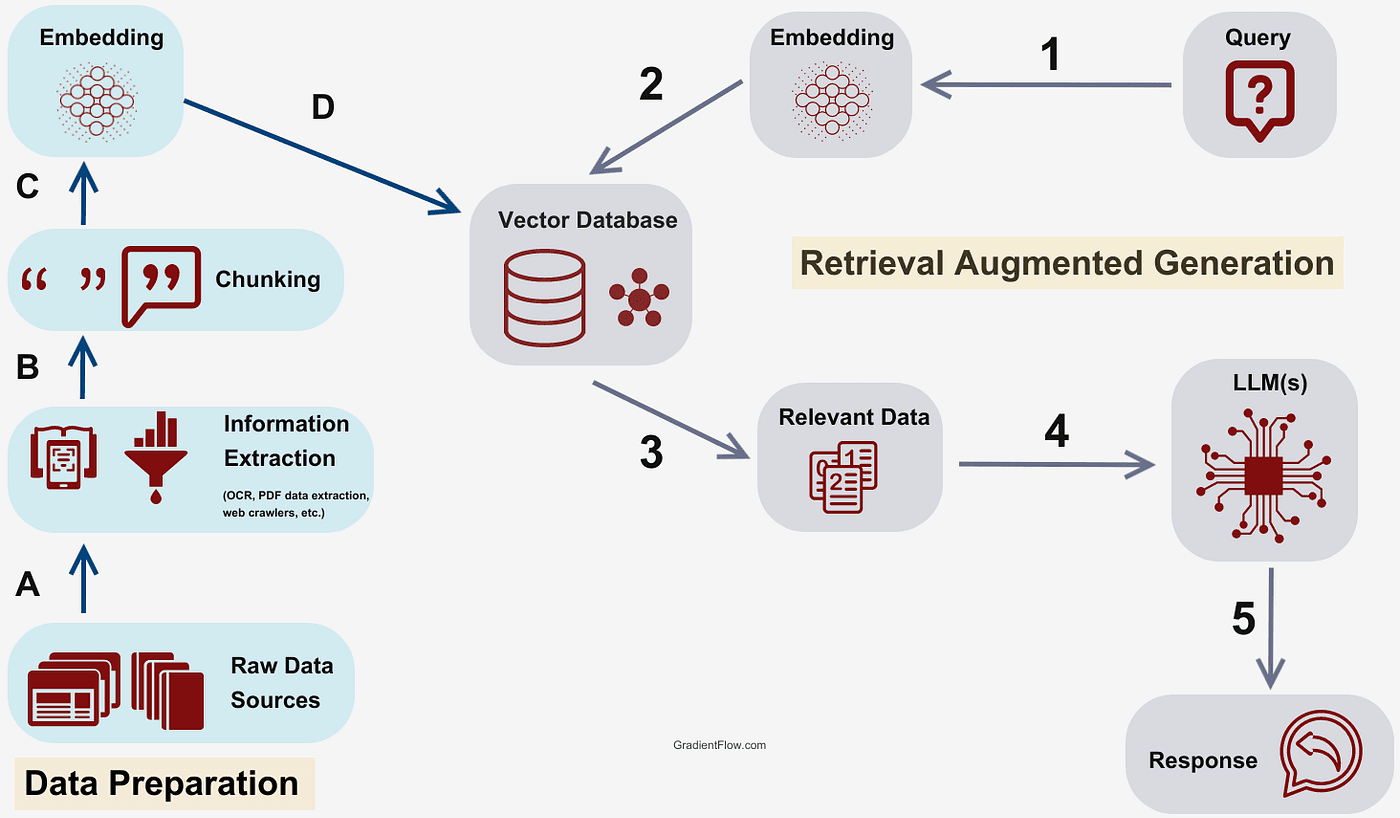
Nothing in the query "Origin" appears in the matching sentence, which is the whole point: FAISS is searching by meaning, not by keyword overlap. The last step is turning that retriever into a tool with the same shape as get_users or web_search from earlier:
from langchain_core.tools import create_retriever_tool

retriever = vector_store.as_retriever(search_kwargs={"k": 5})
retrieval_tool = create_retriever_tool(
    retriever=retriever,
    name="kb_search",
    description="Search information about me"
)

search_agent = create_agent(
    model=llm,
    system_prompt="Search information about the person in the knowledge base",
    tools=[retrieval_tool]
)

search_agent.invoke({"messages": [HumanMessage("Where are they from?")]})
From the agent's side, kb_search looks exactly like get_users or tavily_search did: a name, a description, a function to call. RAG isn't a separate architecture bolted onto the graph, it's a vector store wearing the same @tool interface as everything else in this post.
What I'd tell myself before starting
An agent, tools, and memory turned out to be three separate, composable decisions rather than one big framework choice: which model, which functions it's allowed to call, and which checkpointer, if any, remembers the conversation. Middleware, structured output, and retrieval all slot into that same shape once you've seen it: a hook around the model, a schema instead of free text, a tool that happens to search a vector store instead of the web. Nothing about it is magic once it's broken down into those pieces. The part I haven't touched yet is guardrails, the notebook's next section and still an empty page, which is exactly where I'm picking this back up.